How to Check & Fix Your Phone Numbers
If you've been frustrated because sellers aren't answering your calls, your phone number could be part of the problem. One or more of the three major phone carriers may be showing your number as "Spam Likely" or "Scam Likely."
We're now offering a FREE service that lets you check up to 3 phone numbers to see if they've been flagged.
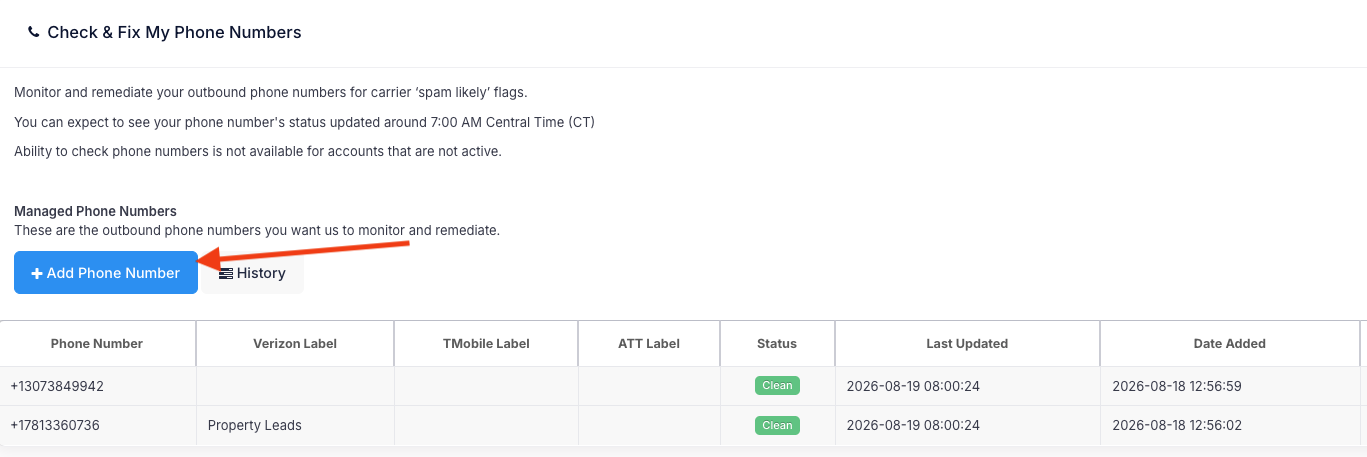
If we find that one of your numbers is flagged, we fix it. Once it's fixed, you'll see the number marked as "Clean" in your dashboard.
The report will also show whether your business name appears on Caller ID. If it doesn't, we recommend contacting your phone provider to set it up. Having your business name show when you call can help more sellers recognize your number and answer.
How Phone Number Monitoring & Remediation Works
Our Phone Number Monitoring & Remediation service gives you daily visibility into how your number appears across three carrier networks and helps you remove damaging labels when they appear.
Every day, we:
- Place a test call using your number to three phones, one for each carrier.
- Record exactly how your number appears.
- Display the results in your online portal.
- Report the name displayed if you subscribe to branded calling.
- Submit the required paperwork to the affected carrier the same day if a spam or scam label appears.
- Manage the carrier’s manual remediation process.
Definitions for what you see in the dashboard:
- Unknown: The number added has not returned a status update yet
- Clean: No issue across all 3 major carriers
- Flagged: The number has been identified with a "Spam Likely" results and currently being fixed.
How to Access and Use This Feature
- 1️⃣ Log into the Property Leads platform.
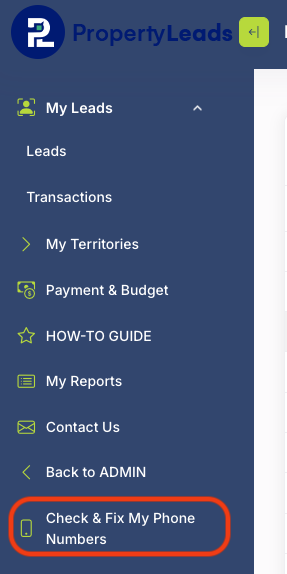
- 2️⃣ On the bottom left side of your menu, select "Check & Fix My Phone Numbers."
- 3️⃣ Click "+Add Phone Number," add the phone number you want checked, and click "Save."
Video Walkthrough
View a video demo of the "Check Phone Numbers" feature in the Property Leads platform below:
Let us know if you need any help!
Was this article helpful?
That’s Great!
Thank you for your feedback
Sorry! We couldn't be helpful
Thank you for your feedback
Feedback sent
We appreciate your effort and will try to fix the article